
Software Corporates

Asana Software

0.00 verified reviews

Asana is a cloud-based software that makes project management a lot easier for enterprises. It centralizes all communication, which removes all kinds of ambiguity in task delegation. This helps with smooth coordination, where every member is aware of what task they are supposed to perform within a given deadline. The solution ensures that projects are managed without any hassle. Asana software reviews are also available on our website. You can check them out to find out the experience of other people with this software. 

  • Free demo available
  • Expert guidance
  • Cloud-based
  • SaaS
Asana  Software gallery image 1 of 5

1 / 5

What Is Asana Software?

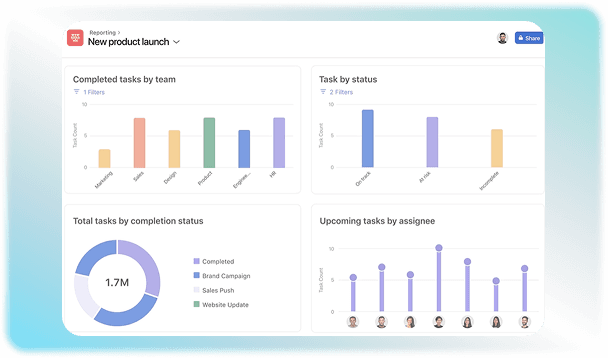
Asana is project management software that helps teams manage daily tasks efficiently. You can use it to assign tasks to members and keep track of how far they have progressed. Team members can chat, share files, and leave feedback inside the task they are working on in the software. This keeps the communication organized in a place to keep a clear record. 

Who Can Use The Asana Program?

This software can be used in almost every industry because it helps optimize workflows that can help both individuals and companies to grow. The platform is flexible and meets the requirements of many different types of users and job roles. These include: 

  • Freelancers can keep track of client work by maintaining a daily to-do list.

  • Companies connect different offices and departments through this software so everyone gets a view of the same company goals.

  • Managers can assign and shift tasks to the team to keep workload manageable.

  • Marketing teams plan social media posts and schedule product launch events through Asana tools. 

  • Sales teams use it to manage daily client contacts.

Asana Integrations

It connects with more than 200 third-party applications and tools that your team uses on a daily basis for tasks like file sharing and communication. Some of the common integration options are listed as follows: 

  • Google Drive

  • Slack 

  • Microsoft Teams 

  • Splunk

  • Jira Cloud

  • Toggl Track 

  • Trello 

  • Harvest 

  • One Drive

Cost Of Asana

An Asana free version is available that can be used by solo users or a maximum of 2 individuals.  The pricing of the paid plans varies based on the features offered in that tier. You can take a look at a brief comparison of these prices:

Plan Tier

Monthly Billing Price

Best For

Personal

$0

Solo users who have to manage basic tasks

Starter

$13.49 / user/mo

Growing teams that need timelines, custom fields, and automations

Advanced

$30.49 / user/mo

Fast-growing teams that require quick workload tracking

Enterprise / +

Custom quote

Large organizations requiring advanced security, SAML SSO, and compliance

Is Asana The Best Project Management Software For You?

Asana PM solution is an easy-to-use platform that can make coordination and task management efficient.  Small and mid-level organizations can use this software to collaborate on different projects. This software keeps a complete record of tasks and ensures they are completed before the deadline approaches. You can check out the 

demo automation software to find out how this solution can be useful for you. Contact us for further queries.
8 capabilities included

Specifications

What Asana Software covers across workflows, access, and support.

  • Time Monitoring

    Included

  • Report Generation

    Included

  • Budget Management

    Included

  • Resource optimization

    Included

  • Task Assignment

    Included

  • Project Scheduling

    Included

  • Intuitive Dashboards

    Included

  • Mobile Application

    Included

5 core capabilities

Asana Software Features

Explore what Asana Software offers—from day-to-day workflows to advanced capabilities.

1

Multiple Project Views

Asana project software allows you to view and organize the same project with different built-in layouts. You can monitor progress through a List view, which displays tasks as an easy-to-read checklist. Board views display tasks as visual columns like To Do or Done in Kanban style. A Calendar view is also available that puts all your due dates on a monthly or weekly grid, so that you do not skip any deadline. 

2

Workflow Automation

Reduce the manual effort by automating tasks through custom rules. For instance, it can assign a new task that was in the pipeline when the previous one is completed. This also lowers the chances of error because the software ensures at every step that all necessary tasks have been completed

3

Task Tracking

 The software gives you clear instructions about the task and when it is expected to be completed. It can make long tasks manageable by breaking them down into smaller chunks that can be fulfilled more efficiently. Custom labels can also be added to let the team know which tasks must be completed on a priority basis. 

4

Collaboration

Asana platform makes communication a lot easier by letting team members add comments or share feedback in the solution itself. It prevents the hassle of writing and searching emails to see how content is evaluated. All teams can also stay on the same page in this way. This saves up time for meetings that are conducted for updating and scheduling new tasks. 

5

Resource Management

The software helps managers with capacity management by evaluating how much workload is assigned to each person. They can use it to balance the work, so no one gets overwhelmed. 

A quick look at strengths and trade-offs

Pros and Cons

Pros

  • The interface of the Asana platform is user-friendly.
  • You can switch between different views according to your preferences.
  • The free plan is a good option for individuals for tasks that do not need complex features.
  • It integrates with a vast number of applications to make the workflow smooth.

Cons

  • You can assign one job to one worker, which can be a problem for teamwork.
  • The prices can scale at a faster rate compared to competitors.

Verified buyer feedback

Asana Software Reviews

No reviews yet. Be the first to share how Asana Software works for your team.

Asana Software FAQ

Frequently asked questions

Common questions buyers ask before shortlisting Asana Software.

  • Individuals, freelancers, solo workers, or pairs managing personal projects and basic to-dos can use the free version of Asana. It is an indefinite plan and requires no credit card, but it only supports a maximum of 2 users. 

  • Yes. Asana AI is integrated into paid plans to help automate routine tasks and summarize lengthy project comments to increase the pace of coordinated workflows.

  • Yes. Asana has a mobile application of its own that is compatible with both Android and iOS devices. 

  • There are five main Asana pricing tiers, which include personal, starter, advanced, enterprise, and enterprise+.  Fill in the quote to get more details regarding the cost. 

  • Customer assistance is offered through an automated chatbot, community forums, Asana Academy,  and a digital ticketing system.

Compare similar options

Popular Alternatives

Trello Software

0.0 ★ · 0 Reviews

Compare pricing, reviews, and features for Trello Software in Project Management Software.

Jira Software

0.0 ★ · 0 Reviews

Compare pricing, reviews, and features for Jira Software in Project Management Software.

monday.com Software

0.0 ★ · 0 Reviews

Compare pricing, reviews, and features for monday.com Software in Project Management Software.

Miro Software

0.0 ★ · 0 Reviews

Compare pricing, reviews, and features for Miro Software in Project Management Software.

Pricing & expert advice

See real Asana Software pricing — matched to your team

Tell us how your team operates and a specialist will return with concrete numbers, an honest fit-check, and closely matched options to compare—no sales pressure.

  • ✓ Tailored quote within one business day
  • ✓ Independent fit-check from our advisors
  • ✓ Two or three alternatives to weigh up

Contact us now

Request a free consultation with us

We'll help you find tools that fit your budget and business needs. Share a few details and we'll get back to you.

You accept our policy