Software Corporates

monday.com Software

0.00 verified reviews

monday.com is a flexible work operating system and cloud-based platform where teams manage workflows and daily tasks. This Project Management software is a customizable workspace with an easy-to-use interface, which makes it easier to organize projects and track their progress. Users can create boards based on their specific work requirements. Each board can include tasks, deadlines, status updates, and assigned team members. It makes workflow management easier across different departments of a company. Built-in AI features of this platform help the PMO automate their daily tasks to achieve their goals in less time. You can read monday.com reviews on our website and find out if it is the right project management solution for you. 

  • Free demo available
  • Expert guidance
  • Cloud-based
  • SaaS
monday.com Software gallery image 1 of 5

1 / 5

What Is monday.com Software?

monday.com is a Project Management software that allows teams to manage their projects and day-to-day operations. Its visual tools help in keeping track of the project through customizable dashboards. The platform uses AI agents to automate their workflow to enhance productivity by increasing efficiency of the team. It operates as a cloud-based solution, which means that data in the software is not only synced but also accessible remotely. 

Benefits Of Using monday.com

The most standout benefit of monday software is that it centralizes human and AI collaboration. The incorporation of digital workforce agents results in improvements in business stats by reducing timelines and increasing efficiency to give a higher ROI. Major benefits include:

  • The digital assistance offered by this software helps in automating manual tasks like checking for risks and managing tickets

  • The project timeline becomes faster when data is organized in one platform that can be easily accessed.

  • All the team members are updated about any change because the sales, marketing, tech, and HR teams are connected through the platform. 

  • Programs like monday.com save time by automating tasks that are often repeated, like sending emails. 

  • The data is safe and secure in this solution as it complies with GDPR, SOC 2, and HIPAA guidelines. 

How Much Does monday.com Cost?

monday tool pricing is based on the features offered in the subscription tier and number of user seats. All paid plans require a minimum of 3 seats. If you pay yearly, you save 18% compared to paying month-to-month.

  • Free plan 

  • Basic plan 

  • Standard plan 

  • Pro plan 

An enterprise plan with a custom quote is also offered by the software. It is a suitable option for large corporations that require advanced data security. 

Why Choose monday.com?

monday.com software is one of the most reliable project management platforms that allows human and digital agents to collaborate for better results. You do not need to align your timeline according to rigid templates because this solution lets you customize your workflows. It lets you track your progress and project status visually with clarity for better management. The CRM features offered by the software help in maintaining a record of the sales pipeline, but it can be overwhelming if you want to use this tool for basic tracking. For more clarity, check out the monday.com demo on our website for free! 
9 capabilities included

Specifications

What monday.com Software covers across workflows, access, and support.

  • Activity Dashboards

    Included

  • Access Permissions

    Included

  • Catalogue Management

    Included

  • Data Visualization

    Included

  • Budget Tracker

    Included

  • Rule-Based Workflow

    Included

  • Dashboards

    Included

  • Project Scheduling

    Included

  • KPI Monitoring

    Included

4 core capabilities

monday.com Software Features

Explore what monday.com Software offers—from day-to-day workflows to advanced capabilities.

1

Customizable Workflow

Monday.com allows teams to create workspaces according to their requirements. Users can build customizable boards to manage different types of work. Each board can contain tasks, deadlines, status columns, priorities, and assigned team members. Teams can also choose different views based on how they want to monitor their work. For example, a project can be displayed as a timeline or Kanban board. This flexibility makes the platform suitable for different departments.

2

Task And Project Management

This platform provides tools for managing tasks efficiently. Teams can also divide larger projects into smaller tasks to make the workload easier to manage. Different project views help managers monitor deadlines and check if the work is completed or not. 

3

Workflow Automation

monday com software has automation tools that can increase workflow by reducing the need for manual data entry. Teams can create automation rules according to their workflow requirements. This feature is useful for projects that involve the same processes that have to be repeated multiple times. 

4

Dashboards And Reporting

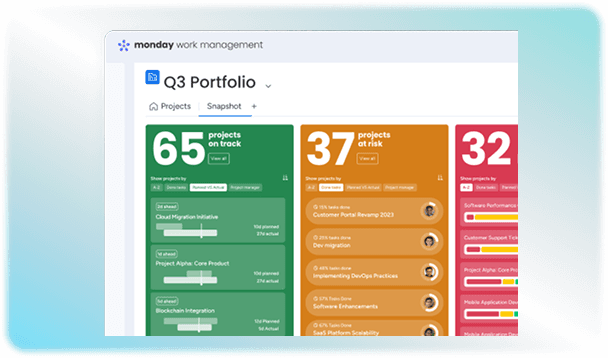
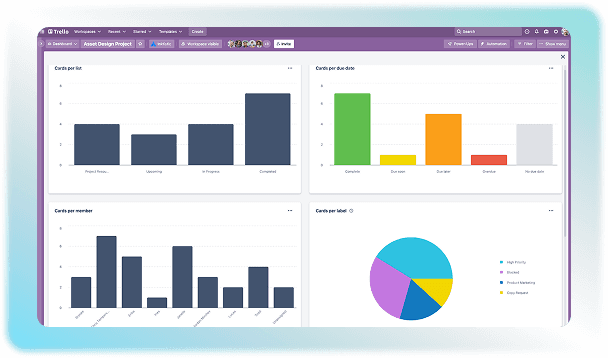
The dashboards in this platform provide a visual summary of the progress of the work. It lets you take a look at how the deal moves through different stages. It also has built-in AI agents that automatically generate daily progress recaps and flag tasks behind schedule. This brings anomalies to attention so they can be fixed on time. 

A quick look at strengths and trade-offs

Pros and Cons

Pros

  • The multiple view feature of this software makes it convenient for different types of teams.
  • Projects can be viewed through boards, timelines, calendars, and other formats as per the preference of users.
  • Repetitive tasks can be automated to save time.
  • The visual layout of the software makes projects easier to manage.

Cons

  • Small teams may find the platform more detailed than required.
  • Access to advanced features requires users to opt for costly monday.com pricing plans

Verified buyer feedback

monday.com Software Reviews

No reviews yet. Be the first to share how monday.com Software works for your team.

monday.com Software FAQ

Frequently asked questions

Common questions buyers ask before shortlisting monday.com Software.

  • No. Your data is never used to train public AI models. The software assures that your workspace data remains private.

  • Yes. monday.com offers a free plan with unlimited time for up to two users and basic features. You can access this plan without adding a credit card. 

  • Both SMBs and large enterprises utilize monday.com project management software. It is used by the PMO, marketing team, sales team, IT department, legal teams, and HR department. 

  • The platform offers enterprise-grade security, including compliance with GDPR, HIPAA, and AICPA SOC 2 standards. This ensures that the data is protected from violations and privacy breaches. 

  • This software can integrate with multiple third-party applications like GitHub, ClickUp, HubSpot, Gmail, Google Ads, Microsoft Teams, Outlook, Jira Cloud, Slack, SurveyMonkey, Zoom, etc. 

Compare similar options

Popular Alternatives

Trello Software

0.0 ★ · 0 Reviews

Compare pricing, reviews, and features for Trello Software in Project Management Software.

Asana Software

0.0 ★ · 0 Reviews

Compare pricing, reviews, and features for Asana Software in Project Management Software.

Jira Software

0.0 ★ · 0 Reviews

Compare pricing, reviews, and features for Jira Software in Project Management Software.

Pricing & expert advice

See real monday.com Software pricing — matched to your team

Tell us how your team operates and a specialist will return with concrete numbers, an honest fit-check, and closely matched options to compare—no sales pressure.

  • ✓ Tailored quote within one business day
  • ✓ Independent fit-check from our advisors
  • ✓ Two or three alternatives to weigh up

Contact us now

Request a free consultation with us

We'll help you find tools that fit your budget and business needs. Share a few details and we'll get back to you.

You accept our policy