Software Corporates

Trello Software

0.00 verified reviews

Trello Project Management software is a collaboration tool that allows teams to organize and share projects through a visual Kanban board system. It keeps complete track of projects to help the team see who is working on which task and when. This solution allows the team to map out the workflow through customized boards for clarity. The use of this software makes management easier by centralizing communication and allowing the team leaders to know the progress of the assigned tasks. 

  • Free demo available
  • Expert guidance
  • Cloud-based
  • Online Software
Trello  Software gallery image 1 of 4

1 / 4

What Is Trello Software?

Trello is a visual project management and collaboration software owned by Atlassian that uses a digital Kanban board system to organize and track task progression. It makes task management easier for the team as well as managers. The status of the task can be displayed on the cards, which lets members know the progress of the project. Its use allows task completion on time by making coordination easier and eliminating the need to arrange meetings to check on the current status of the assigned tasks. 

Who Can Use Trello PM Software?

Both teams and individuals can use this solution to manage their projects with utmost ease. Individuals can use it to set goals for themselves and manage their daily work lists. Small teams use the Trello software to assign tasks and track progress to ensure tasks are completed within the deadline. Even enterprises can benefit from it to manage their workflows by making coordination efficient. The common use cases include:

  • Software teams use it to track sprints, backlogs, and bug reports.

  • Marketing teams can manage editorial calendars and blog post production through this software. 

  • HR and operations utilize the platform to handle employee onboarding and IT support tickets. 

What Is Inside A Trello Card?

Cards are a prominent component of this Trello tool that allow multiple tasks to be managed conveniently. The cards make it easier to differentiate tasks through visual elements. The movement of a card across different lists allows everyone to see what stage a specific item is in at any given moment. The following aspects are usually included in these cards: 

  • Title and description 

  • Checklist 

  • Due dates 

  • Members 

  • Activity feed

  • Labels 

  • Attachments 

Trello Plans And Pricing

There are multiple pricing tiers available with annual or monthly billing options. The features and size of the teams must be considered before selecting the plan for your team. Trello costs include:  

Plan

Billed Monthly/ User

Billed Annually/ User

Best For

Free

$0

$0

Individuals and smaller teams

Standard

$6 

$5 

Growing small teams

Premium

$12.50 

$10

Cross-functional projects

Enterprise

N/A

$17.50 

Large organizations

Is Trello The Best PM Software For You?

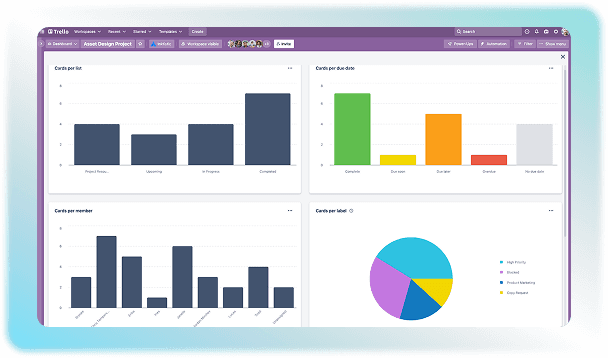
Trello program is a good project management software if you are looking for a fast and simple Kanban tool for tracking tasks. However, it falls short if you require complex reporting or detailed time tracking features. You can choose this software if you want an easy-to-use platform that lets you set up a board and start moving cards in five minutes with zero formal training. Trello pricing also varies with the types of features a certain team requires. You can get more information by watching a demo for free. 
10 capabilities included

Specifications

What Trello Software covers across workflows, access, and support.

  • Team Supervision

    Included

  • Time Tracking

    Included

  • Mobile App

    Included

  • Task Management

    Included

  • Intuitive Dashboard

    Included

  • Time Tracking

    Included

  • Resource Optimization

    Included

  • Advanced Analytics

    Included

  • Project Scheduling

    Included

  • Budget Handling

    Included

5 core capabilities

Trello Software Features

Explore what Trello Software offers—from day-to-day workflows to advanced capabilities.

1

Cards

Trello software solution is an organized platform that utilizes Boards to represent a centralized space for a workflow. Within each board, Lists act as vertical columns that are used to determine the status of the task, such as To-Do, In Progress, or Done. Cards include individual tasks, which can be easily dragged and dropped between lists.

2

Due Dates And Reminders

There are built-in scheduling tools in the software that use colors like yellow and red to flag tasks that are approaching or overdue. This prevents teams from manually checking the deadlines, which helps in maintaining the momentum of the task. 

3

Trello Inbox And Planner

The inbox is like a digital notepad where you can quickly jot down ideas from external sources like email, Slack, and Microsoft Teams. The Planner allows you to drag-and-drop cards onto a calendar to block out focus time. These features facilitate teamwork and save time at the same time. 

4

Automation

Butler in Trello is a built-in tool that automates repetitive tasks and actions on your boards. It makes the work quicker because it removes the need for tedious manual work.  

5

Power-Ups

Extend the functionality of a Trello board through add-ons and extensions. These plugins are called power-ups. They allow the platform to adapt to almost any industry or project type.

A quick look at strengths and trade-offs

Pros and Cons

Pros

  • The drag-and-drop board layout of the software is easy to use and learn.
  • Trello has a great free version that offers many more features than other software. It allows teams to set up 10 group workspaces and use basic helper tools.
  • Its flexibility ensures that it can be used for a vast number of tasks of different natures.
  • It makes project management easier by providing smooth and secure data exchange.
  • Team members can see project progress by looking at the board, which cuts down on the need for repetitive status-check meetings.

Cons

  • Trello struggles with complex project sequencing. If one task changes or is delayed, subsequent dependent tasks do not automatically adjust.
  • The system can lag when there are multiple members and cards at the same time.
  • It does not have a built-in clock to track work hours.

Verified buyer feedback

Trello Software Reviews

No reviews yet. Be the first to share how Trello Software works for your team.

Trello Software FAQ

Frequently asked questions

Common questions buyers ask before shortlisting Trello Software.

  • The Trello pricing depends on the plan you choose. Although a free version of Trello is available, other versions include detailed features. The cost can go up to $17.50 per user per month depending on the plan you select. 

  • Yes. It has an official mobile app available for both Android and iOS devices.

  • Integrations are called Trello power-ups. They allow you to connect your boards directly to external software. Some options include: 

    • Slack 

    • Google Drive 

    • Google Calender 

    • GitHub 

    • Jira Cloud 

    • Miro 

  • Card mirroring is a feature of Trello that allows the same card to be displayed and edited across multiple boards and lists. All these updates are automatically synchronized. 

  • Trello is owned by Atlassian and maintains SOC 2 Type 2, ISO/IEC 27001, and PCI-DSS compliance certifications. All platform data is encrypted and safe from privacy breaches.

Compare similar options

Popular Alternatives

Asana Software

0.0 ★ · 0 Reviews

Compare pricing, reviews, and features for Asana Software in Project Management Software.

Jira Software

0.0 ★ · 0 Reviews

Compare pricing, reviews, and features for Jira Software in Project Management Software.

monday.com Software

0.0 ★ · 0 Reviews

Compare pricing, reviews, and features for monday.com Software in Project Management Software.

Miro Software

0.0 ★ · 0 Reviews

Compare pricing, reviews, and features for Miro Software in Project Management Software.

Pricing & expert advice

See real Trello Software pricing — matched to your team

Tell us how your team operates and a specialist will return with concrete numbers, an honest fit-check, and closely matched options to compare—no sales pressure.

  • ✓ Tailored quote within one business day
  • ✓ Independent fit-check from our advisors
  • ✓ Two or three alternatives to weigh up

Contact us now

Request a free consultation with us

We'll help you find tools that fit your budget and business needs. Share a few details and we'll get back to you.

You accept our policy