
Software Corporates

Miro Software

0.00 verified reviews

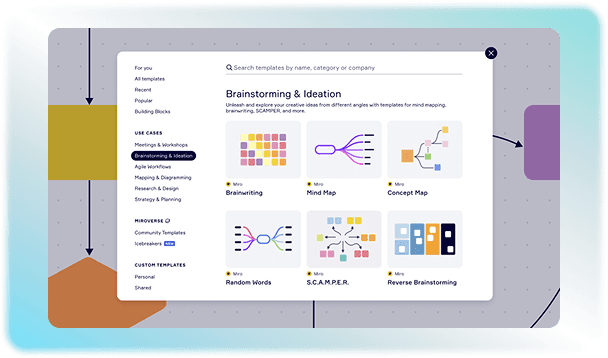
Remote and cross-functional teams need a digital workspace where they can brainstorm and plan their workflow. Miro is a cloud-based software that provides teams with a collaborative space to work together. Team members can work together from anywhere on the same board, so that everyone is aware of all the changes made. The workflow is also accelerated through pre-made layouts that can be used to map the entire work. Miro AI can generate complex mind maps or flowcharts from text prompts. You can explore more features by watching the practical demonstration of the software. Click on the “Watch the demo” button on our website now to check out the Miro demo!

  • Free demo available
  • Expert guidance
  • Cloud-based
  • SaaS
Miro Software gallery image 1 of 5

1 / 5

What Is Miro Software?

Miro is a project management software that provides an infinite canvas for teams to plan and map out their workflows. You do not need to worry about space while using this software because you can edit, draw, attach files, and add sticky notes without any limit. It facilitates the visualization of data to help the team collaborate and make better decisions.  

How Does Miro Boost Workflow In Different Project Stages?

Every single step of the project can be mapped out for clarity using the Miro solution. Users do not need to switch between different apps at any stage because it can manage the project from its idea to an outcome. 

  • Initiation Stage: It gathers research and user feedback into the canvas to centralize data. Members can share their brainstormed ideas using Miro notes. 

  • Planning Stage: Roadmaps and timelines are built through Gantt charts or calendars to track dependencies. 

  • Execution Stage: Visualize task progress, assign responsibilities to the members, and monitor ongoing work on the shared space

  • Closing Stage: Teams can review the completed tasks to find out which aspects worked for them. 

Optimize Operations With Integrations

Miro software can integrate with more than 250 apps and tools to sync the workflow and make communication smoother across teams. The following integrations serve the following purposes: 

Category

Apps

Purpose

Project Tracking

Jira, Azure DevOps, Asana

It aligns the project steps by connecting sticky notes to developer logs.

Documentation Hubs

Notion, Confluence, Google Drive

These integrations help in embedding interactive boards side-by-side with written files and wikis.

Design 

Figma and Adobe Express 

It is used to pull responsive design layouts and video feedback onto the canvas.

Chat and Meetings

Slack, Microsoft Teams, Zoom

You can host boards inside live calls along with a chat channel alert.

Security and Identity

Okta, Microsoft Entra ID 

This manages single sign-on access.

Is Miro Software The Right Option For You?

This solution is a go-to option for teams that want to rely on visuals to organize workflows and plan projects. Its shared canvas makes it easy for teams to collaborate in a cloud setting. Users can use the Miro AI app to work on the same information without juggling between different tools for program coordination. But it might not be the best fit for teams that need a highly structured project management system with advanced resource management and financial tracking. For further details, you can contact our team for practical and expert guidance about Miro pricing and features. Fill in the quotation form on our website to reach out to us now!
9 capabilities included

Specifications

What Miro Software covers across workflows, access, and support.

  • Progress tracking

    Included

  • Activity Dashboard

    Included

  • Task Management

    Included

  • Customer journey Mapping

    Included

  • Content Codes

    Included

  • Data Visualization

    Included

  • Design Templates

    Included

  • Time Monitoring

    Included

  • Graphic Data Representation

    Included

4 core capabilities

Miro Software Features

Explore what Miro Software offers—from day-to-day workflows to advanced capabilities.

1

Infinite Digital Canvas

Miro gives teams an open digital workspace where they can arrange content according to the requirements of their workflow. Users can place documents, images, sticky notes, diagrams, and other resources on the same board. The flexible layout also lets teams expand their workspace as a project grows over time.

2

Collaboration

Multiple users can use this platform at the same time to make coordination easier. Team members can add Miro notes to share their comments on the project tasks and add their input during discussions. 

3

AI-powered Workflow

AI capabilities of this software help teams process information and move ideas forward at a faster pace. It can summarize and organize ideas and content to give them structure. Teams can use these capabilities during planning sessions to structure their ideas. 

4

Interactive Workshop Tools

The software provides facilitation features that make virtual workshops more engaging and easier to manage. Miro Engage lets facilitators run activities such as live polls, word clouds, dot voting, and ranking exercises that can be carried out from all kinds of supported devices. It also facilitates asynchronous sessions through Talktrack, which allows users to record audio or video explanations on the canvas so teammates can review the workshop later. 

A quick look at strengths and trade-offs

Pros and Cons

Pros

  • Miro app downloading is easy on both mobile and desktop.
  • AI features can reduce the time required to organize ideas and process board content.
  • The large collection of templates available in the software helps teams start projects without creating every board from scratch.
  • It is a good option for teams working in remote or hybrid settings because the canvas can be accessed from all supported devices from any location.

Cons

  • New users may need time to learn the platform because of its wide range of features.
  • Large boards can become difficult to navigate when they contain extensive project information, especially for teams that do not establish clear naming and workspace practices.

Verified buyer feedback

Miro Software Reviews

No reviews yet. Be the first to share how Miro Software works for your team.

Miro Software FAQ

Frequently asked questions

Common questions buyers ask before shortlisting Miro Software.

  • Miro offers four subscription tiers based on features and team size, with both annual or monthly billing options. The plans include:

    • Free 

    • Starter 

    • Business 

    • Enterprise 


  • The Miro free plan supports unlimited team members but only provides access to3 editable boards. Your oldest board automatically transitions to view-only status when you create the fourth board. It also lacks private boards; as a result, every board made is visible to your entire workspace. 


  • Your data is encrypted using 256-bit AES at rest and secured via TLS 1.3 in transit across all plan tiers in Miro. 


  • No. Your data is not retained to train its models. Miro holds SOC 2 Type II, ISO/IEC 27001, and ISO 42001 certifications and complies with GDPR and CCPA privacy guidelines


  • Yes. Visitor or Guest roles are available in the paid plans. You can share a public board link with clients or stakeholders on the Starter and Business plans and allow them to view or edit without consuming a paid seat license. 


Compare similar options

Popular Alternatives

Trello Software

0.0 ★ · 0 Reviews

Compare pricing, reviews, and features for Trello Software in Project Management Software.

Asana Software

0.0 ★ · 0 Reviews

Compare pricing, reviews, and features for Asana Software in Project Management Software.

Jira Software

0.0 ★ · 0 Reviews

Compare pricing, reviews, and features for Jira Software in Project Management Software.

monday.com Software

0.0 ★ · 0 Reviews

Compare pricing, reviews, and features for monday.com Software in Project Management Software.

Pricing & expert advice

See real Miro Software pricing — matched to your team

Tell us how your team operates and a specialist will return with concrete numbers, an honest fit-check, and closely matched options to compare—no sales pressure.

  • ✓ Tailored quote within one business day
  • ✓ Independent fit-check from our advisors
  • ✓ Two or three alternatives to weigh up

Contact us now

Request a free consultation with us

We'll help you find tools that fit your budget and business needs. Share a few details and we'll get back to you.

You accept our policy