
Software Corporates

HubSpot CRM Software

0.00 verified reviews

HubSpot is a Customer Relationship Management software that centralizes customer data and streamlines how businesses track and manage leads. This software has a wide range of features that help in giving a boost sales. It brings your sales and marketing teams together into one tool that makes data management a lot easier. The solution is a convenient choice because it has a user-friendly interface, which makes it easy to use and scales right alongside your company.

  • Free demo available
  • Expert guidance
  • Cloud-based
HubSpot CRM Software gallery image 1 of 4

1 / 4

What Is HubSpot CRM Software?

HubSpot is a cloud-based Customer Relationship Management software that is designed to make marketing and sales easy for businesses. It collects data from different departments to keep track of a customer’s journey with a company. The platform makes it easier to share data and also helps in streamlining the workflow by automating manual tasks. Its features help in converting leads into sales through automated email tracking and visual deal pipelines to keep leads engaged. They provide data that enables sales representatives to follow up at the right moment to turn prospects into paying customers.

Managing Team Access And Accounts Inside HubSpot

Multiple departments use this software at the same time without any hassle. Administrators ensure that team members can view and interact with the data that is necessary for their daily tasks to reduce the risk of a privacy breach. HubSpot CRM has a multi-layered infrastructure to protect sensitive customer data.  Administrators can bring their team to one platform easily by sending links through emails where they can access the hubspot crm login. You can provide basic access to employees who only need to view data and assign premium seats to representatives who require advanced automation, and easily track your team's Breeze AI credits. The software also allows the user to create team roles for efficient distribution of work. It also ensures no unauthorized person can view the data without permission. 

Is HubSpot CRM Software Free?

HubSpot offers a free tier without any expiration date. The free plan includes essential tools like contact management, deal pipelines, landing pages, live chat, and basic email marketing. Paid versions are also available for this software with more complex features for larger businesses. HubSpot CRM pricing ranges from: 

  • Free CRM: $0

  • Starter: $15 to $20 per seat

  • Professional: $1,300 (starting bundle)

  • Enterprise: $4,700 (starting bundle) 

Why Should You Choose HubSpot Software?

HubSpot stands out as a CRM software because of its easy-to-use interface and its ability to connect marketing, sales, and service data into one system. It makes the workflow efficient by constantly tracking the progress of different departments and optimizing tasks, which contributes to the growth of the company. It is usually listed among the top 10 CRM software options. You can also read HubSpot software reviews to make the best final decision for your company. 
10 capabilities included

Specifications

What HubSpot CRM Software covers across workflows, access, and support.

  • Social Media Integrations

    Included

  • Performance Dashboard

    Included

  • Centralized Contact Records

    Included

  • Automated Lead Routing

    Included

  • Customer Coordination Monitoring

    Included

  • Email Management

    Included

  • Opportunity Management

    Included

  • Custom Support Service

    Included

  • Visual Deal Boards

    Included

  • Sales And Invoicing

    Included

5 core capabilities

HubSpot CRM Software Features

Explore what HubSpot CRM Software offers—from day-to-day workflows to advanced capabilities.

1

Data Management

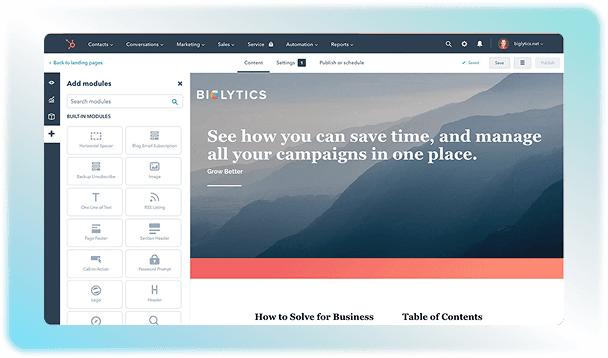
Use this software to organize your customer database without any manual data entry. HubSpot groups all emails, phone calls, notes, and website visits into one contact record. It also has built-in AI features that merge duplicate contacts to keep the data clean. The solution can also group your contacts into lists that update themselves on the basis of customer actions.  

2

Marketing Automation

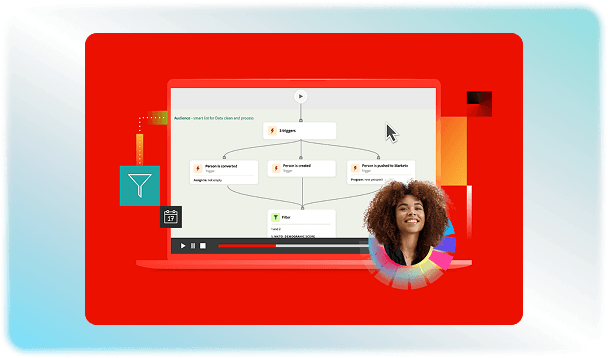
HubSpot CRM software creates automatic email campaigns that come into action when a customer clicks a specific link or fills out a form. It also schedules social media posts and tracks which paid ads generate the most revenue. 

3

Sales And Pipeline Enablement

The visual deal boards in the software track sales opportunities on a drag-and-drop pipeline board. It also notifies the sales team to alert them when a customer interacts with a link. You can also share a custom calendar link so leads can book a meeting without back-and-forth emails.  

4

Customer Service Tools

It assigns customer issues to specific support team members based on their skills or availability, so that the query can be resolved within time. It can also send satisfaction surveys once the issue has been dealt with. You can also give customers access to a help library, so they can find their answers themselves. 

5

Reporting

Track the performance of your team through HubSpot software to find out the results of your sales and marketing campaigns. This helps in evaluating which ad, blog post, or email brought in paying customers.  

A quick look at strengths and trade-offs

Pros and Cons

Pros

  • The system has an easy setup and is simple to learn through the HubSpot Demo.
  • Small teams can use basic contact and deal tracking for free
  • Marketing, sales, and support teams share the same data to ensure smooth communication.
  • The built-in learning center teaches your team how to use the software.

Cons

  • Adding more active team members costs extra money.
  • You cannot change every part of the database to fit unique needs.
  • The cost gets very high when you move to paid plans.

Verified buyer feedback

HubSpot CRM Software Reviews

No reviews yet. Be the first to share how HubSpot CRM Software works for your team.

HubSpot CRM Software FAQ

Frequently asked questions

Common questions buyers ask before shortlisting HubSpot CRM Software.

  • You can save up to 1 million contacts in your database for free and starter plans. For professional and enterprise plans, you are only billed for the Marketing Contacts that you actively target

  • The setup time of HubSpot depends on your business size and needs. It can be set up for small teams within a few hours, but for mid-market and enterprise tiers, it can take 30 to 90 days due to custom data migration and complex workflows. 

  • Yes. HubSpot has a completely free tier with no expiration date for basic features. It also offers a 14-day free trial for its premium enterprise plans.

  • Yes. The HubSpot mobile app is available for both iOS and Android devices.

  • HubSpot CRM has an official App Marketplace with more than 1500 pre-built integrations. It connects with external software like Gmail, Outlook, Slack, Zoom, Shopify, QuickBooks, and Salesforce. The platform also offers an open API for internal software connections.

Compare similar options

Popular Alternatives

Marketo Engage CRM Software

0.0 ★ · 0 Reviews

Compare pricing, reviews, and features for Marketo Engage CRM Software in CRM Software.

SuperOffice CRM Software

0.0 ★ · 0 Reviews

Compare pricing, reviews, and features for SuperOffice CRM Software in CRM Software.

Meritto CRM Software

0.0 ★ · 0 Reviews

Compare pricing, reviews, and features for Meritto CRM Software in CRM Software.

Claritysoft CRM Software

0.0 ★ · 0 Reviews

Compare pricing, reviews, and features for Claritysoft CRM Software in CRM Software.

Pricing & expert advice

See real HubSpot CRM Software pricing — matched to your team

Tell us how your team operates and a specialist will return with concrete numbers, an honest fit-check, and closely matched options to compare—no sales pressure.

  • ✓ Tailored quote within one business day
  • ✓ Independent fit-check from our advisors
  • ✓ Two or three alternatives to weigh up

Contact us now

Request a free consultation with us

We'll help you find tools that fit your budget and business needs. Share a few details and we'll get back to you.

You accept our policy