
Software Corporates

Canvas LMS Software

0.00 verified reviews

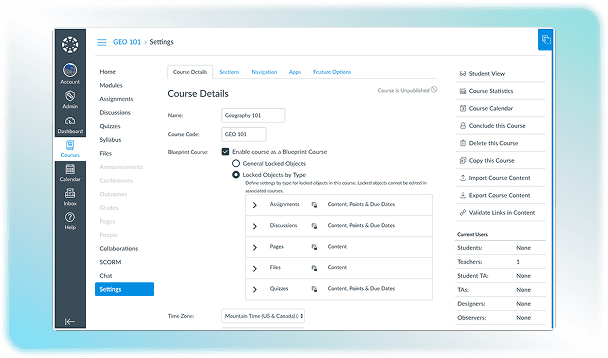
Canvas LMS is a cloud-based software that is used by educational institutions and corporates for sharing courses or assignments with students. It provides a platform for instructors to create, organize, share, and design courses according to their needs. This software is accessible remotely, which ensures uninterrupted learning from any place at any time. A free version of this software is also available, but institutional use and enterprise features require paid licenses. 

  • Free demo available
  • Expert guidance
  • Cloud-based
  • Saas
Canvas LMS Software gallery image 1 of 5

1 / 5

What Is Canvas LMS Software?

Canvas is a learning management software created by Instructure to host online classes and share course content. It can also be used for grading assignments and leaving feedback separately for each student. This is a cloud-based solution, which means that it facilitates remote learning. It also makes communication between students and teachers easier to ensure the learning process continues without any obstructions. 

Who Can Use Canvas?

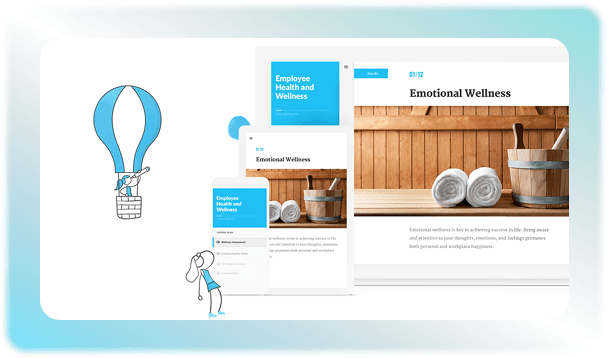
This software can be used by members of educational institutions, which mainly include students and teachers. Parents can also access the platform to track the academic performance of their children. Administrators of K-12 and higher education can use the Canvas program to manage the enrollment process. This software can also be used by corporate organizations to train their employees and keep track of the training programs to ensure regulatory compliance. The cost of Canvas Instructure is customized for every institute, as it varies with the features and number of users. 

Steps For Canvas Login

The login process into the Canvas software is very simple if you have the correct credentials that can be added. You just need to follow these steps to access your account on this platform: 

  • Find your organization's URL

  • Enter your credentials and complete the multi-factor authentication if required. Most institutes require a Single Sign-On portal where you have to join through your main campus credentials. 

  • If you are using a free account that is not associated with a school, you can log in directly through the Free Canvas Account Login page. 

How Much Does Canvas LMS Cost?

This software does not have a fixed price because it offers custom plans to every client. Usually, the Canvas pricing for schools depends on the total number of users, the education tier, the level of technical support, and chosen feature add-ons. The free-for-teacher option that was previously available is no longer functional for this solution.  

Is Canvas LMS The Right Option For You?

This software is a reliable and scalable option for established and growing institutions. It can handle large amounts of data without crashing. It can also integrate with a vast number of third-party applications to ensure smooth functioning without any hurdles. But it may not be a suitable option if you are an institution with a limited budget and lack IT resources. You can evaluate the pros and cons of Canvas to find out if it is the right fit for your organization. The cost is not fixed, which lets you create a custom quote that can meet the requirements of your organization.  Contact us for more Canvas LMS pricing details.
10 capabilities included

Specifications

What Canvas LMS Software covers across workflows, access, and support.

  • Training Management

    Included

  • Activity Dashboard

    Included

  • Learner Portal

    Included

  • Role-Based Permissions

    Included

  • Applicant Monitoring

    Included

  • Student Dashboard

    Included

  • Canvas Student App

    Included

  • Certification And Licensing

    Included

  • Attendance Tracking

    Included

  • Asynchronous Learning

    Included

4 core capabilities

Canvas LMS Software Features

Explore what Canvas LMS Software offers—from day-to-day workflows to advanced capabilities.

1

Course Analytics

The software allows administrators to track students' activity on the app, like they can find out when someone logged in and how much course they have completed. The Canvas course management system also compares individual quiz scores and grades against the class average to find students who need extra help. 

2

Speed Grader

This is an online tool in the Canvas that lets teachers view, grade, and comment on student assignment submissions in one place. It makes the checking process efficient and quick.  

3

Course Management And Design

It offers tools that can be used by the instructors to build and organize their online classrooms. Teachers can use learning management systems Canvas module tools to arrange the content in chronological order to ensure students can learn a concept with ease. 

4

Canvas Studio

This is a built-in video tool that can utilized to provide interactive lessons. Teachers can use it to record their computer screens an quick video lectures, and they can even insert quiz questions into the video timeline to test student understanding. Students may type comments or ask questions at a timestamps to create a productive discussion.  

A quick look at strengths and trade-offs

Pros and Cons

Pros

  • A complimentary teacher and student free version is available on this platform.
  • It supports a wide range of integrations and plug-ins that enhances Canvas LMS features.
  • This software is a reliable option, as it rarely crashes and everything is available safely in the cloud.
  • SpeedGrader utility allows fast grading, so students get quick feedback and work on the areas that need more attention.

Cons

  • The learning curve is slightly difficult, which can be overwhelming to use the software at first.
  • Limited customization options can give a bland look to the interface.
  • The system expects submissions even in courses where no digital upload was required by the instructor

Verified buyer feedback

Canvas LMS Software Reviews

No reviews yet. Be the first to share how Canvas LMS Software works for your team.

Canvas LMS Software FAQ

Frequently asked questions

Common questions buyers ask before shortlisting Canvas LMS Software.

  • No. Canvas pricing is different for each organization because it is customized according to the total number of users and the tech support required. You will have to pay an extra price for the add-on modules. 

  • The solution supports more than 35 international languages. English is chosen as the default option for this software. 

  • It can connect to a vast number of external systems using Learning Tools Interoperability standards and its own Canvas REST API. Some integration options include:

    • Zoom 

    • Panopto

    • Microsoft Teams 

    • Turnitin 

    • Google drive 

    • Microsoft 365

  • Yes. Instructure offers three distinct native mobile applications free on iOS and Android, including Canvas Student, Canvas Teacher, and Canvas Parent.

  • Yes. Parent login is completely supported by this platform. Parents or guardians can register for an Observer Account to check the progress of their children.

Compare similar options

Popular Alternatives

Articulate 360 LMS Software

0.0 ★ · 0 Reviews

Compare pricing, reviews, and features for Articulate 360 LMS Software in LMS Software.

TalentLMS Software

0.0 ★ · 0 Reviews

Compare pricing, reviews, and features for TalentLMS Software in LMS Software.

Blackboard Learn LMS Software

0.0 ★ · 0 Reviews

Compare pricing, reviews, and features for Blackboard Learn LMS Software in LMS Software.

Schoology LMS Software

0.0 ★ · 0 Reviews

Compare pricing, reviews, and features for Schoology LMS Software in LMS Software.

Pricing & expert advice

See real Canvas LMS Software pricing — matched to your team

Tell us how your team operates and a specialist will return with concrete numbers, an honest fit-check, and closely matched options to compare—no sales pressure.

  • ✓ Tailored quote within one business day
  • ✓ Independent fit-check from our advisors
  • ✓ Two or three alternatives to weigh up

Contact us now

Request a free consultation with us

We'll help you find tools that fit your budget and business needs. Share a few details and we'll get back to you.

You accept our policy