
Software Corporates

Articulate 360 LMS Software Review: Features, Pricing & More

Articulate 360 LMS Software

0.00 verified reviews

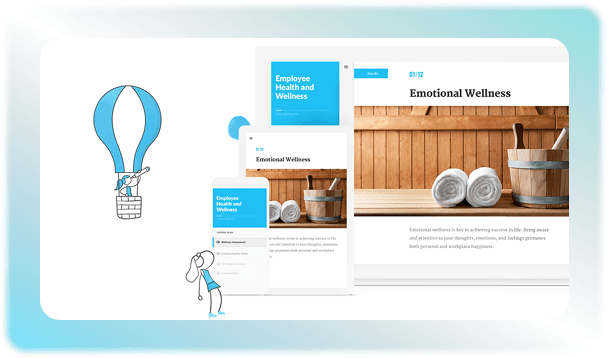
Articulate 360 is an all-in-one e-learning software that allows creators to design and publish interactive training content. It offers two tools for course creation called Rise 360 and Storyline 360 to build lessons according to your requirements. The built-in AI features increase the pace of content generation. The AI assistant can be used by instructors to create summaries or draft quick quizzes to minimize writer’s block. You can use the endless content library to drag-and-drop visuals and texts relevant to your courses. Book an Articulate 360 demo now to find out about other features of this LMS software. 

  • Free demo available
  • Expert guidance
  • Cloud-based
  • Saas
Articulate 360 LMS Software gallery image 1 of 5

1 / 5

What Is Articulate 360 LMS Software?

Articulate 360 is a course creation tool that is used by instructors to design and edit online lessons that can be shared with students. This platform lets corporate businesses and educational institutes create course content as per their preferences. Pre-made templates are also available if you want to build quick courses in shorter span of time. You can use this solution to make the lessons engaging and beneficial at the same time. The AI-based tools offered by this software include:

  • Rise 360

  • Storyline 360

  • Review 360

Articulate 360 Integrations

This solution can connect with other LMS software and artificial intelligence assistants to automate your training process. The main integration options include: 

  • Google Drive 

  • Zapier 

  • Slack

  • Claude

  • Microsoft Copilot

  • Absorb LMS

  • Moodle

  • Canvas

  •  Adobe Learning Manager

How To Use Articulate 360?

Access your Articulate 360 login dashboard online to select the tool you need. You can go for Rise for quick web courses, or Storyline for customization. Start course creation by either choosing a template or uploading your source materials for the AI Assistant that can be used to create new lessons. Assemble your lesson using drag-and-drop features and also add text, images, and quizzes. After this, publish your draft to Review 360 so that the team members and clients can leave comments on the pages for feedback. The lessons can then be exported to other LMS software, and you can also track the progress through this solution. 

Why Choose Articulate 360?

Articulate 360 is an eLearning development and workplace training platform. You do not need multiple tools to create and track a course when you are using this solution. It offers speed as well as customization through its tools. You can export your courses using compliance formats like SCORM, xAPI, AICC, cmi5 to track student scores in your existing LMS. Contact us for more Articulate 360 pricing details! 

Book A Demo

Schedule an Articulate demo for free to see how the software operates. Evaluate the pros and cons to get a better idea. Get in touch with us for more information.

12 capabilities included

Specifications

What Articulate 360 LMS Software covers across workflows, access, and support.

  • Asynchronous Learning

    Included

  • Audio And Video Recording

    Included

  • Activity Tracking

    Included

  • Assignment Management

    Included

  • Built-In Course Authoring

    Included

  • Compliance Management

    Included

  • Content Library

    Included

  • Progress Tracking

    Included

  • Multimedia Support

    Included

  • Training Management

    Included

  • SCORM Compliance

    Included

  • Learner Portal

    Included

4 core capabilities

Articulate 360 LMS Software Features

Explore what Articulate 360 LMS Software offers—from day-to-day workflows to advanced capabilities.

1

Course Authoring

There are two main tools offered by this solution. You can use Rise 360 to build quick block-based web courses in your browser. On the other hand, Storyline 360 allows you to design customizable courses by adding slide layers, animations, or any other kind of graphic elements that complement the course. The AI capabilities speed up the course creation process by allowing the user to type text prompts or upload source files, which are converted to ready-made courses. 


2

Activity Dashboard

Articulate LMS uses activity dashboards to keep the projects organized. Creators can log in to the software to check the ongoing course drafts and manage access to different folders. Review 360 feature also lets you receive feedback from external stakeholders on the slides. 


3

AI Assistant Capabilities

The built-in AI features increase the pace of work by helping in the process of course generation. The Articulate AI assistance can convert text to voiceovers using unique voices. Custom visuals can also be generated through this platform to make lessons relevant and engaging at the same time. It also instantly auto-generates graded quizzes and learning checks from your lesson content.


4

Customizable Branding

The training courses can be given a professional and official feel to reflect your brand identity. You can add your logos and design it according to your institution’s color scheme. Storyline 360 gives you a blank canvas that can be customized in any way for personalization on a visual level. 


A quick look at strengths and trade-offs

Pros and Cons

Pros

  • Based on Articulate reviews, you get instant access to millions of free templates and royalty-free resources available in the content library.
  • Clients and teammates can leave comments on your project screen to make the editing process super fast.
  • Built-in AI tools make course generation quick.
  • The community support for this software is very strong because millions of people use it and share their insights on different forums.

Cons

  • The performance of the software can lag when using media-heavy files in Storyline 360.
  • Storyline 360 requires a Windows operating system. There is no native Mac application.
  • Annual pricing is an expensive option for smaller teams.

Verified buyer feedback

Articulate 360 LMS Software Reviews

No reviews yet. Be the first to share how Articulate 360 LMS Software works for your team.

Articulate 360 LMS Software FAQ

Frequently asked questions

Common questions buyers ask before shortlisting Articulate 360 LMS Software.

  • Articulate Storyline is not sold separately. It is exclusively available as part of the broader Articulate 360 subscription bundle. Fill in the quotation form on our website to get more pricing details. 


  • Yes. You can get a free trial of Articulate 360 AI for 14 days, and you do not need a credit card to sign up. 


  • Yes. It has a desktop app, but it is not available for mobile phones.


  • You own the copyright to all the e-learning courses you build using the software. Articulate does not claim ownership over your course files or AI-generated outputs. 


  • Yes. Articulate has strict privacy policies wth a zero-data-retention policy for their AI engine providers. This means that your company data is not used to train public models.


Compare similar options

Popular Alternatives

TalentLMS Software

0.0 ★ · 0 Reviews

Compare pricing, reviews, and features for TalentLMS Software in LMS Software.

Blackboard Learn LMS Software

0.0 ★ · 0 Reviews

Compare pricing, reviews, and features for Blackboard Learn LMS Software in LMS Software.

Schoology LMS Software

0.0 ★ · 0 Reviews

Compare pricing, reviews, and features for Schoology LMS Software in LMS Software.

Canvas LMS Software

0.0 ★ · 0 Reviews

Compare pricing, reviews, and features for Canvas LMS Software in LMS Software.

Pricing & expert advice

See real Articulate 360 LMS Software pricing — matched to your team

Tell us how your team operates and a specialist will return with concrete numbers, an honest fit-check, and closely matched options to compare—no sales pressure.

  • ✓ Tailored quote within one business day
  • ✓ Independent fit-check from our advisors
  • ✓ Two or three alternatives to weigh up

Contact us now

Request a free consultation with us

We'll help you find tools that fit your budget and business needs. Share a few details and we'll get back to you.

You accept our policy