
Software Corporates

Practice Fusion EHR Software

0.00 verified reviews

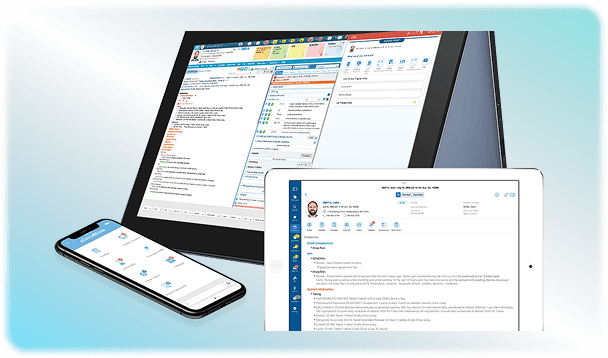
Practice Fusion is an Electronic Health Record software for independent and solo medical practices operating at a smaller scale. It simplifies medical practice management by providing a platform that brings clinical, administrative, and financial functions of a healthcare system in one place. This solution facilitates custom charting, as healthcare providers can customize the templates according to their specialties. Patient engagement also increases through the integrated Patient Fusion portal, which allows them to access their medical histories and complete paperwork online. The cloud-based solution can be accessed from anywhere through all supported devices, including desktops and mobiles. Want to know more? Get in touch with us to book a Practice Fusion demo for free!

  • Free demo available
  • Expert guidance
  • Cloud-based
Practice Fusion EHR Software gallery image 1 of 5

1 / 5

What Is Practice Fusion EHR Software?

Practice Fusion is a web-based electronic health records platform to digitize and manage the operations of independent medical practices. It facilitates the workflow of healthcare practices by providing a platform where clinical and administrative activities can be automated. The solution also offers a range of tools that cover the financial front in terms of invoicing and billing. All patient records and other sensitive information are stored in this EHR software without the risk of data breach. 

How Do Small And Solo Practices Benefit From Practice Fusion?

This electronic health records software is an affordable option for independent healthcare practices that want a centralized platform where the data of different departments is stored. You do not need to spend any money to set up hardware or hire an IT team to operate it. All the data is stored securely in the clud that can be accessed by supported devices.

This practice suite supports over 50 specialties and offers customizable charting templates and workflows based on different clinical environments. Updox Practice Fusion is an integrated partner and communication suite for this software. It adds enhanced patient engagement and document management directly into the EHR workflow. Other integration options include:

  • BillRMD 

  • Zocdoc

  • AdventisHealth

  • Tebra

  • Quest Diagnostics

  • LabCorp

  • Surescript

  • Walsgreen

Pricing Options

This software has straightforward prices, as it does not offer multiple enterprise tiers to choose from. The invoicing is done monthly, but is tied to an annual contract. PracticeFusion pricing is based on a single-tier model with a 12-month commitment. The base price begins at $199 per provider per month. The add-on charges include:

  • Integrated billing services: this ranges between  $300 and $1500+ per month, with a percentage fee of 4% to 7% of total monthly collections for full-service revenue cycle management.

  • Payment processing ranges from 2.5% to 3.5% + $0.15 to $0.30 per transaction for card swipes or online portal payments.

A 14-day free trial is available for this HealthFusion without entering any credit card details. Each provider license includes access for 3 signing staff, like nurse practitioners, and unlimited non-signing staff licenses such as front-desk receptionists. 

Security And Compliance

Practicefusion keeps all the patient information safe from any unauthorized viewing and data breaches by staying compliant with HIPAA guidelines. It also includes a MIPS insights dashboard that tracks your data, which makes it easy for your independent medical practice to meet federal healthcare reporting rules and avoid any financial penalties. 

Is Practice Fusion The Best EHR?

Practice Fusion software is one of the top electronic medical records for solo and independent clinics with a limited budget. It is simple to set up because it runs on the cloud, and no local installations or hardware are required to run it. Practitioners can increase the workflow by opting for specialty-specific templates to take notes. It also reduces the administrative burden by automating tasks like patient scheduling and taking care of the financial aspects at the same time. All these features are available at budget-friendly prices without hidden costs. Get in touch with our team by filling out the quotation form on our website and receive unbiased advice from experts. 
12 capabilities included

Specifications

What Practice Fusion EHR Software covers across workflows, access, and support.

  • HIPAA Compliance

    Included

  • Patient Record Management

    Included

  • Charting

    Included

  • Patient Scheduling

    Included

  • E-Prescribing

    Included

  • Appointment Scheduling

    Included

  • Self-Service Portal

    Included

  • Therapy Notes

    Included

  • Claims Management

    Included

  • Role-based Permission

    Included

  • Customizable Templates

    Included

  • Laboratory Integrations

    Included

5 core capabilities

Practice Fusion EHR Software Features

Explore what Practice Fusion EHR Software offers—from day-to-day workflows to advanced capabilities.

1

Patient Fusion Portal

The software provides a portal for patients that allows them to check their medical records at any time. After Patient Fusion portal login, they can also book an appointment for themselves and fill out online forms without going to the hospital. This feature also reduces the burden on the front desk staff because the software ensures no appointments clash with each other. 

2

Customizable Charting

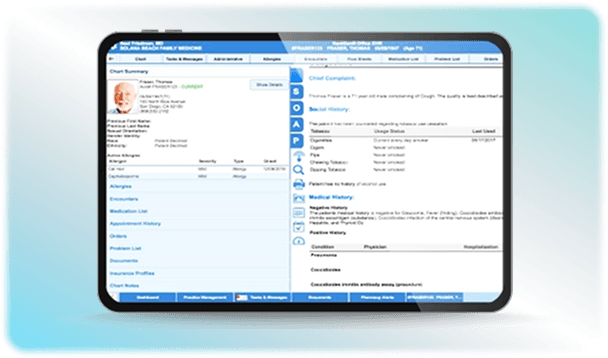
Practitioners can use the pre-made specialty-specific templates available in Practice Fusion Community Library. They can use the Note-Assist shortcut to reduce typing and generate both SOAP notes and simple notes based on their preferences. 

3

Billing Tools

This EHR tool links the clinical documentation with the financial workflow to increase the chances of claim acceptance. ICD-10-ready coding is a built-in tool in the software that helps you select the correct diagnostic codes during documentation without memorizing them. If you don't want to handle billing yourself, Practice Fusion has a team of experts you can hire. They will take care of your insurance paperwork by fixing the rejected claims and help collect payments. 

4

e-Prescribing

Doctors can generate and send electronic prescriptions straight to the pharmacy. Practice Fusion software is also certified to meet all DEA requirements for electronic prescribing of controlled substances in all US states. 

5

Lab And Image Links

You can order tests with just a few clicks. The system automatically fills in the patient's personal details and medical history onto the order form so you don't have to type them out. The results are also sent from the local labs into the patient’s electronic file online to save time on paperwork.                                                                                                                                                    

A quick look at strengths and trade-offs

Pros and Cons

Pros

  • It includes unlimited accounts for non-signing staff, like receptionists and assistants, which makes it affordable for small clinics
  • Practice Fusion login is easy, accessible, and intuitive.
  • The software can be accessed from anywhere, which helps in timely management of emergency situations.

Cons

  • The process of moving or rescheduling appointments on the main office calendar is complicated.
  • The platform works best for general primary care. It lacks specialized features needed for high-complexity medical specialists like mental health providers.

Verified buyer feedback

Practice Fusion EHR Software Reviews

No reviews yet. Be the first to share how Practice Fusion EHR Software works for your team.

Practice Fusion EHR Software FAQ

Frequently asked questions

Common questions buyers ask before shortlisting Practice Fusion EHR Software.

  • No. Practice Fusion software does not offer a free version. It currently costs $199 per provider per month under a required 12-month contract. You can fill in the pricing quote on our website to get more details regarding the software cost.

  • The Practice Fusion platform runs best on modern browsers. Google Chrome, Mozilla Firefox, and Microsoft Edge are supported and recommended for the best experience.

  • Yes. Each paid provider license allows you to add unlimited non-signing staff accounts like front-desk staff, receptionists, or medical billers with no extra charge

  • No. It is a web browser that can be accessed through a desktop, laptop, mobile phones or tablet.

Compare similar options

Popular Alternatives

AdvancedMD EHR Software

0.0 ★ · 0 Reviews

Compare pricing, reviews, and features for AdvancedMD EHR Software in EMR Software.

eClinicalWorks EHR Software

0.0 ★ · 0 Reviews

Compare pricing, reviews, and features for eClinicalWorks EHR Software in EMR Software.

NextGen Office EHR Software

0.0 ★ · 0 Reviews

Compare pricing, reviews, and features for NextGen Office EHR Software in EMR Software.

athenaOne EHR Software

0.0 ★ · 0 Reviews

Compare pricing, reviews, and features for athenaOne EHR Software in EMR Software.

Pricing & expert advice

See real Practice Fusion EHR Software pricing — matched to your team

Tell us how your team operates and a specialist will return with concrete numbers, an honest fit-check, and closely matched options to compare—no sales pressure.

  • ✓ Tailored quote within one business day
  • ✓ Independent fit-check from our advisors
  • ✓ Two or three alternatives to weigh up

Contact us now

Request a free consultation with us

We'll help you find tools that fit your budget and business needs. Share a few details and we'll get back to you.

You accept our policy