Software Corporates

Pipeline CRM Software

0.00 verified reviews

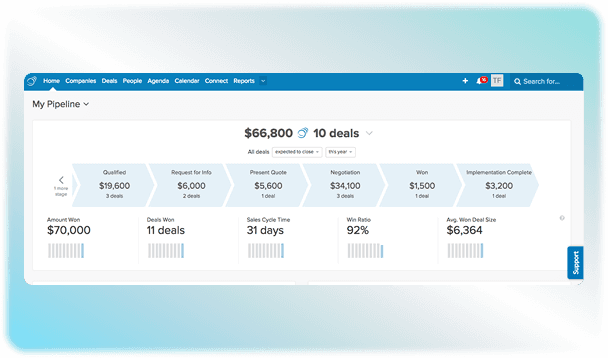
Pipeline CRM is a cloud-based software for small and mid-sized teams to manage their sales. It keeps track of leads and manages them to streamline their revenue workflows. The main purpose of this software is to facilitate the sales team by mapping out the sales cycle using a visual interface. The activities of individual deals can be completely tracked through this software to predict upcoming revenue. A free Pipeline CRM demo is also available on request. Check it out to know more about its features. 

  • Free demo available
  • Expert guidance
  • Cloud-based
  • Saas
Pipeline CRM Software gallery image 1 of 2

1 / 2

What Is Pipeline CRM Software?

Pipeline CRM was formerly known as Pipeline Deals. It is a sales-focused customer relationship management software that allows businesses to track, manage, and visualize deals as they move through different stages of the sales process. Unlike other CRMs, it is not used for customer support ticketing and contact database. The main purpose of this software is to provide a visual pipeline of how a sale proceeds. 

Integration Options For Pipeline

There is a vast list of native integrations for this software. It can also connect with third-party applications to smooth the workflow of the sales team. The common PipelineDeals CRM integrations are listed as follows: 

  • Outlook 

  • Quickbooks 

  • Mailchimp

  • Slack 

  • Zoom 

  • Microsoft Teams 

  • Zapier 

  • Linkedin 

Pipeline CRM Cost

There is no permanent free plan, but you can get a 14-day trial for this software. The pricing plans have both annual and monthly billing options per user per month. You will have to pay an extra cost if you want to include add-ons. Pipeline pricing can be divided into the following tiers

  • Start ($25 per user/month annually)

  • Develop ($33 per user/month annually)

  • Grow ( $49 per user/month annually)

  • Enterprise (custom quote)   

Why Choose Pipeline Software?

Small and mid-size organizations prefer this software to optimize their sales. Its ease of use and visual organization make it a standout option for sales teams. The platform is so intuitive that teams can log in and start closing deals without training. It also does not need a complex setup to operate. You can use this solution to keep control of the visual pipeline by keeping a detailed record of the entire sales pipeline to make better predictions about a company's revenue.  

Get A Pipeline CRM Demo!

Are you still unsure whether this software is worth your time and money? Find out now by watching a free demo. Get in touch with us, and we will give you a practical demonstration of how this software works. 
7 of 9 included

Specifications

What Pipeline CRM Software covers across workflows, access, and support.

  • Contact Management

    Included

  • Revenue Prediction

    Included

  • Deal Tracking

    Included

  • Customer Communication Tracking

    Included

  • Email Sync

    Included

  • Visual Sales Board

    Included

  • Opportunity Management

    Included

Not included

  • Social Media Integration

    Not included

  • Customer Service

    Not included

4 core capabilities

Pipeline CRM Software Features

Explore what Pipeline CRM Software offers—from day-to-day workflows to advanced capabilities.

1

Visual Deal Tracking

Pipeline software uses drag-and-drop Kanban boards to show where a deal lies at a particular moment in time. The cards and columns are arranged in the solution with precision to keep a visual track of all the stages a sale goes through. 

2

Sales Forecasting

The software analyzes your open deals to estimate the revenue it may generate in the future. This helps you plan your business budget and see if you will hit your sales goals according to the current plan. 

3

Activity And Task Automation

You can skip the manual work by using Pipeline CRM software to automate manual tasks. Backend actions are carried out automatically when a deal changes stages, such as automatically creating a follow-up task or sending an internal alert. This helps you save both time and effort. 

4

Task Management

The platform can become your daily digital to-do list to make sure all tasks are performed on time. It keeps track of your phone calls, emails, and meetings in a centralized space. It reminds you who to contact each day to make sure all clients are attended to.

A quick look at strengths and trade-offs

Pros and Cons

Pros

  • It deploys in days without needing a dedicated admin
  • Pipeline CRM login is very easy because its intuitive interface requires minimal training
  • This solution is a great option for solo users and small teams who do not need extra licenses

Cons

  • The reporting and analytics can be improved. This feature is pretty basic compared to options like Salesforce.
  • The mobile option is not at parity with the desktop version, according to Pipeline CRM reviews.
  • It is not a great option for enterprises with complex sales processes.

Verified buyer feedback

Pipeline CRM Software Reviews

No reviews yet. Be the first to share how Pipeline CRM Software works for your team.

Pipeline CRM Software FAQ

Frequently asked questions

Common questions buyers ask before shortlisting Pipeline CRM Software.

  • It syncs directly with Gmail and Outlook to track correspondence and send automated campaigns. 

  • No. Pipeline CRM software does not offer a free plan, but you can get a free trial for 14 days to test the platform features. The trial runs on the top standard plan, and you do not need to enter your credit card details to access it. 

  • The deployment time for Pipeline is very quick, as it takes only 2 to 4 weeks. 

  • Yes. Pipeline CRM has a mobile app of its own with no extra cost that is compatible with both iOS and Android devices. 

  • Yes. You can upload contacts, companies, and deals easily using CSV or Excel files through the Pipeline CRM Help Center tools

Compare similar options

Popular Alternatives

HubSpot CRM Software

0.0 ★ · 0 Reviews

Compare pricing, reviews, and features for HubSpot CRM Software in CRM Software.

Marketo Engage CRM Software

0.0 ★ · 0 Reviews

Compare pricing, reviews, and features for Marketo Engage CRM Software in CRM Software.

SuperOffice CRM Software

0.0 ★ · 0 Reviews

Compare pricing, reviews, and features for SuperOffice CRM Software in CRM Software.

Meritto CRM Software

0.0 ★ · 0 Reviews

Compare pricing, reviews, and features for Meritto CRM Software in CRM Software.

Pricing & expert advice

See real Pipeline CRM Software pricing — matched to your team

Tell us how your team operates and a specialist will return with concrete numbers, an honest fit-check, and closely matched options to compare—no sales pressure.

  • ✓ Tailored quote within one business day
  • ✓ Independent fit-check from our advisors
  • ✓ Two or three alternatives to weigh up

Contact us now

Request a free consultation with us

We'll help you find tools that fit your budget and business needs. Share a few details and we'll get back to you.

You accept our policy